Introducing AI in Databrewey to Create Template
Helped in creating template ~35% faster then before.
What is Template
So Template are used to setup you labeling setup before starting your labeling and different data type have different template it also depends upon the use case too.
Therefore template plays a curial role in the labeling flow.
Browse Templates
Visual
Code
Configure Data
Use audio from field
$audio1
Use audio from field
$audio2
Use audio from field
$audio3
Add Choices
Use new line as a separator to add multiple labels
Add
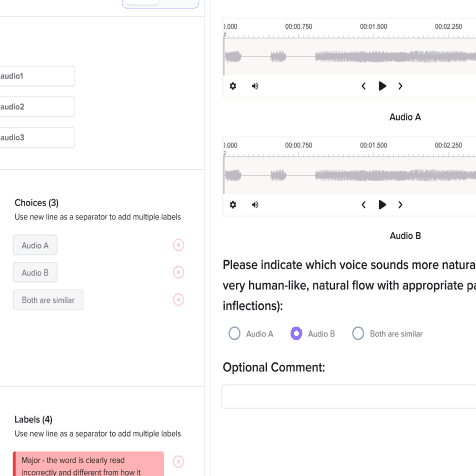
Choices (3)
Use new line as a separator to add multiple labels
Audio A
Audio B
Both are similar
Add Label Names
Use new line as a separator to add multiple labels
Add
Labels (4)
Use new line as a separator to add multiple labels
Major - the word is clearly read incorrectly and different from how it would be represented in a pronunciation dictionary
Foreign_Word - the word is foreign word and proper name is read incorrectly
Voice Quality - the word is enunciated
Configure settings
Select text by words
Display Labels:
bottom
Add filter for long list of labels
Save
UI Preview

Audio A
Audio B
Please indicate which voice sounds more natural overall (i.e. Sound is very human-like, natural flow with appropriate pauses and inflections):
Audio A
Audio B
Both are similar
Optional Comment:
Regions
History
Relationships
Information
Comments
Manual
By Time
Regions not added
Why need to create Custom Template
As different data type and use case need different template to support that. Without a perfect template the labeling process cannot carry forward/start.
Browse Templates
Murf AI
Computer Vision
Natural Language
Processing
Audio/Speech
Processing
Conversational AI
Ranking & Scoring
Structured Data
Parsing
Time series
Analysis
Videos
Generative AI
Generate by AI
Automatic Speech Recognition
Automatic Speech Recognition
Automatic Speech Recognition
Automatic Speech Recognition
Automatic Speech Recognition
Problem?
Creating Custom template for different kind of data is manual and laborious work which takes time and
⌛= 💸
Is it a real problem?
Yes! Not me trying to add AI everywhere -Aipaglu

See It Yourself
You need to CODE, freeking code the template from scratch.
Ofc our developer uses
ChatGPT
Browse Templates
Code
Visual
1
UI Preview
Regions
History
Relationships
Information
Comments
Manual
By Time
Regions not added
AI Mode
Just describe what you want and you will be getting it ready in seconds.

Browse Templates
Visual
Code
AI
Databrewery AI
I’m your Databrewery AI Assistant, here to help you create customized labeling templates effortlessly. Whether you're starting from scratch or refining an existing setup, I’ll guide you through building templates that fit your project perfectly.
Ask Anything...
UI Preview
Save As
Regions
History
Relationships
Information
Comments
Manual
By Time
Regions not added
What’s the Actual Problem?
A dedicated coder needs to be assigned to create even generate those code form ChatGPT and for any self serve product not a ideal situation, as a user might not be an developer or the business who will be using this product might not have a developer team.
What this AI solves?
Replaces manual effort to even go to ChatGPT to generate code. A non tech person can easily create a customize template for there data in seconds.
Chat Screen v.1
In the chat screen we get a clean slate to start with you can start with giving prompt in natural language and the AI will create you the elements in the preview section accordingly and you can provide adjacent prompt to remove or add more element to create the final template.
Designs need time to ship🚢
Chat Screen v.2
The version 2 will be having suggestions and follow-up suggestion which will help the user to create a comprehensive template. And also wont make the user clueless what to do with this chat.
Browse Templates
Visual
Code
AI
Databrewery AI
I’m your Databrewery AI Assistant, here to help you create customized labeling templates effortlessly. Whether you're starting from scratch or refining an existing setup, I’ll guide you through building templates that fit your project perfectly.
Rajiv Ray

Create a template for two audio data and labels called noise and disturbance
Creating
Ask Anything...
Take Aways
Not making features over complecated and to just give what the user really asks and if they really need something there will be signs. Somthime thinking simple is the key to create a better user experience and flow.